01304 827609 info@use-ip.co.uk Find us

DS-7608NI-E2-8P V3.3.0 trying to adding a DS-2CD2366G2-ISU_SL

Hagar

Member
Messages
5
Points
1
Hi everyone,


I’m currently using a Hikvision DS‑7608NI‑E2/8P NVR running firmware V3.3.0, with 8 x DS‑2CD2332‑I (Build V5.2.5) cameras connected.


Here's my situation:


  • I removed the old camera on channel 8 and tried adding a new DS‑2CD2366G2‑ISU/SL.
  • In Camera Management, I couldn’t delete the old configuration line.
  • I tried editing that line to match the new camera’s IP—but the NVR still wouldn’t add it.

So my questions are:


  1. Is there a way to add this new camera with my current NVR setup?
  2. Is my NVR simply too old to support this newer camera model?
  3. Can I upgrade the firmware on my NVR to make it compatible?
  4. Or should I consider buying a newer NVR instead?

I’ve checked some suggestions online but haven’t had any luck so far. Any advice or help would be fantastic.


Thanks in advance! Peter
 
Yes there is a way
Using Batch Configuration Tool you need to disable new security on camera in order to connect to this old NVR

Add camera to BCT and press More and under security put Close

Then you can add it
 
Yes there is a way
Using Batch Configuration Tool you need to disable new security on camera in order to connect to this old NVR

Add camera to BCT and press More and under security put Close

Then you can add it
Hi first thanks for your reply.
I have downloaded latest Batch Tool and tried to apply as you suggested but it is greyed out and I don't see secruity option?
let me know tor thoughts on how to fix this?

see image attatched.
thanks Peter
 

Attachments

  • Batch greyed out2 .png
    Batch greyed out2 .png
    44.8 KB · Views: 59
Hi @Hagar ...

I don't use BCT too often, but I think you need to select the camera and hit "Add"... BCT will ask for the camera password and then move the camera from the "lower" list to the "upper" list... then you should be able to select it from the "upper" list and continue with "More" as @trempa92 suggests.

Batch greyed out2 .png
 
Hi John,

thanks for you reply did as you said and actually added camera to top section but in NVR still i have issue to recognise camera. I tried a few different settings but no go.


So my thoughts are

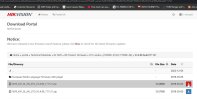
1) do I upgrade firmware from my old version v 3.3.4 to the v3.4.98_171121 which I downloaded from https://www.hikvisioneurope.com/eu/portal

2) will the OLD 7600 series NVR recognise bad firmware version?

3) I don't want brick it , if I do can I reverse the damage to previous version?

2) will this only give me basic Functions anyway like add camera and record as this camera has Mic Sound speaker functions etc.

3) Buy another NVR so I can add newer cameras to it with full functionality?


I appreciate your thoughts on anyone who has done this already what's best choice here (see screens shot of actual firmware file download )
thank you Peter
 

Attachments

  • Firmawre version.jpg
    Firmawre version.jpg
    96.8 KB · Views: 42
Hi John,
thanks for you reply i did as you said and actually added camera to top section but in NVR still i have issue to reconise camera. I tried a few different settings but no go.

So my thoughts are
1) do Ii upgrade firmware from my old version v 3.3.4 to the v3.4.98_171121 which I dowloaded from https://www.hikvisioneurope.com/eu/portal
2) will the OLD 7600 series NVR reconise bad firmware version?
3) I dont want brick it , if i do can i reverse the damage to previous version?
2) will this only give me basic Functions anyway like add camera and record as this camera has Mic Sound speaker functions etc.
3) Buy another NVR so I can add newer cameras to it with full functionality?

I appreciate your thougths on anyone who has done this already whats best choice here (see screens shot of actual fimare file download ) thank you Peter
 
I tried a few different settings but no go.

Are you sure you selected "Close" as @trempa92 suggested? I think this is the setting he was referring to:

Screenshot 2025-09-02 125203.png


I would definitely consider getting a newer NVR as the E series is quite dated, has limited bandwidth, and does not get any new firmware updates related to security. Also, it may not play well with the latest Hik-Connect if you use it.

If you do want to try upgrading the firmware, the NVR generally will not load a firmware that was not intended for it... but I think you may need to step though loading interim versions before loading the latest... I'm not sure, but I've definitely seen that required before when others have updated very old firmware. So, if you are going to try updating, I would suggest loading the V3.4.2 build 160205 first and see how that goes.

The latest version for your NVR seems to be V3.4.106 build 191009... I think you missed that because it is towards the top of the list:

Screenshot 2025-09-02 130514.png


Decisions, decisions! Let us know how you go :)
 
Oh im sorry to bump this late, there is special versuon of batch configuration tools that have that, will upload when i get the chance
 
Back
Top