01304 827609 info@use-ip.co.uk Find us

Hikvision DS-7608NI-M2 / Hikvision DS-3E0510P-E

kruja

Active Member
Messages
40
Points
8
I am creating a new IP video surveillance setup.
- Hikvision DS-7608NI-M2
- 2387G3 i 2347G3 *2.
- Hikvision DS-3E0510P-E 8 Port

I have two questions.
-Is it possible to directly connect NVR and PoE Switch or they have to connect to the router(local network).
-What is the difference when connecting the cameras directly to the PoE NVR or when connecting via
PoE switch ?


I want to avoid directly connecting the cameras to the NVR because of possible fan noise.


I am creating a new IP video surveillance setup.
- Hikvision DS-7608NI-M2
- 2387G3 i 2347G3 *2.
- Hikvision DS-3E0510P-E 8 Port

I have two questions.
-Is it possible to directly connect NVR and PoE Switch or they have to connect to the router(local network).
-What is the difference when connecting the cameras directly to the PoE NVR or when connecting via
PoE switch ?


I want to avoid directly connecting the cameras to the NVR because of possible fan noise.


Firstly you need to confirm whether your NVR is a /8P model as the standard M2 doesn’t have PoE ports.

You can directly connect the NVR to the PoE switch and the switch to the network I f you want.

If cameras are connected directly to the NVR PoE the camera traffic is kept off the LAN as the NVR uses a different network for the PoE ports.

Where you connect the cameras has no effect at all on the fan. Your M2 fans will run regardless, so if you don’t want to hear it you’ll need to think about locating the NVR where it won’t be an issue (loft)
 
As an alternative:

IF you can source one, I’d suggest check out the price point of the non-POE DS-7616NI-M2 vs the non-POE DS-7608NI-M2 you’re considering.

You might find the price point of the non-POE DS-7616NI-M2 very attractive (or not).

The fan is still noisy though. If you don’t care about the warranty you can reduce the noise level by swapping the fan out for a Noctua branded one.
 
That's completely crazy. have paid and am waiting for the NVR to arrive DS-7608NI-M2/8P.The technical specifications show that the power consumption is 15 watts,if the power supply for the cameras is not included.
Why is the operation of the fan necessary?
-- Has anyone tried to turn off the fan on the board?
-- The switch is PoE, is there a possibility to damage the NVR if they are connected directly?
@sportster
Can you recommend which Noctua fan to buy?

 
That's completely crazy. have paid and am waiting for the NVR to arrive DS-7608NI-M2/8P.The technical specifications show that the power consumption is 15 watts,if the power supply for the cameras is not included.
Why is the operation of the fan necessary?
-- Has anyone tried to turn off the fan on the board?
-- The switch is PoE, is there a possibility to damage the NVR if they are connected directly?
@sportster
Can you recommend which Noctua fan to buy?

What made you think that the fan wouldn’t operate. Virtually all Hikvision NVRs have a case fan. As I posted a few weeks back, the NXI-K1(D) models that didn’t have a fan were temporarily removed from sale while suppliers retrofitted them following a higher number of returns.

As has been explained before, you can fit one of the so called ‘silent’ fans. Just search 40mm silent case fan. Noctua is one of many. It's a 2 pin 12V connection but the ones that come with a 3 pin connection usually also have an adapter. It will not remove the noise completely. While the fan is silent(ish) the noise of the air being blown through the perforated metal case is not. Additionally the M2 uses an internal PSU and that has its own fan.

You can of course just disconnect the internal fan by unplugging it from the PCB (at your own risk). I have a number of sites where the fan is not connected without an issue (after a couple of years). The reported HDD temperatures vary but usually those without a fan run only 4 or 6 degrees C warmer and are well within the hard drives specifications.

With regard to the NVR being connected directly to a PoE switch it is no issue. PoE only delivers power to a device once it’s negotiated that the device needs it so it won’t send power if a non PoE device is connected.
 
Last edited:
I doubt I can add much beyond what JB has already provided.

I too feel it’s the air blowing thru the perforated case that’s responsible for the bulk of noise. If you have room inside your case, you might offset the fan by about 1”…… it’s still not silent but it is quieter.

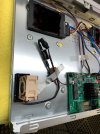
The attached pic is from my non-POE DS-7616NI-M2 with an external PSU. The fan is offset about 1” or so. Your /8P version will look substantially different with the internal PSU and POE ports.

I’m using the Noctua NF-4Ax20 FLX mainly because the NF-4Ax10 FLX was not readily available at the time. The narrower NF-4Ax10 FLX might be better suited for the /8P, but without seeing the internals of the /8P, I can’t recommend one fan model # vs the other. Either may work for you.

Double sided Velcro was used to hold the fan in place.

Of course all this is at your own risk. And your mileage may vary.
 

Attachments

  • IMG_5073.jpeg
    IMG_5073.jpeg
    907.4 KB · Views: 58
I changed both fans in my old 7608NI-I2/8P (or a part number very similar to that..) When I updated to the 7616NI-M2/16P it was immediately evident that the OEM fans weren't as loud as what came on my old 7608NI-I2 NVR. So I haven't bothered swapping the Noctua's into the 7616 M2 yet.

One thing I did have happen was the 7608 came with a 2TB WD purple HD when new, and after a year or two I fitted a second HD- a10TB WD purple behind the power supply. The hard drive in that position runs at a noticeably higher temp than the one on the other side of the case. As it worked out, that newer and larger hard drive died and the original 2TB didn't. Since that occurred, I always make the point of fitting the cheaper hard drive on the power supply side. Or, if you're running one, don't fit it behind the power supply.

I've got the 7616NI-M2/16P rack mounted and recently designed/ 3D printed a magnetic "fan tray" that sticks underneath the the NVR's base- it blows through the holes in the base. I fitted a USB powered 80mm (?) fan to the tray and it blows air up inside the NVR directly onto the base of the hard drives. That has substantially reduced the hard drive temps in both drives inside the 7616, and it's running all stock fans. (You can see the temps in the NVR's settings menu.)
 
Is it possible to remove the HDD disk? Buy a SATA data cable 0.5 m and a housing for the HDD disk.
I put the HDD disk next to the NVR and thus the temperature in the NVR decreases.
Is it possible to do that?
 
Is it possible to remove the HDD disk? Buy a SATA data cable 0.5 m and a housing for the HDD disk.
I put the HDD disk next to the NVR and thus the temperature in the NVR decreases.
Is it possible to do that?
I can't see why you couldn't do that. Keep in mind that it's the HDD rather than the NVR itself that's at risk of failure due to excess heat. Another user mentioned it's potentially a lack of airflow/stagnant air that can cause the issue (mentioned in another post ("return of the fans"). So if you were to put the HDD external to the NVR in a caddy, you'd need to ensure that the enclosure had sufficient ventilation (though I'm sure it would run cooler than it does within the NVR)
 
@JB1970
That means my idea is good.
When the NVR arrives and I finish the install, I'll post pictures here.
I plan to have a total of 4 / 5 cameras.
 
There's also a fan type vent hole on side of the NVR where the power supply is (IIRC) - so another fan exhausting the hot air fitted there would help drag cool air in through the holes in the base under the hard drives.

I'd also suggest fitting higher feet under the NVR if you have it sitting on a shelf, as that will help dissipate heat. If you lift the NVR up and feel the shelf underneath it will be warm if it's made from wood or any other heat insulator.
 
I've got the 7616NI-M2/16P rack mounted and recently designed/ 3D printed a magnetic "fan tray" that sticks underneath the the NVR's base- it blows through the holes in the base. I fitted a USB powered 80mm (?) fan to the tray and it blows air up inside the NVR directly onto the base of the hard drives. That has substantially reduced the hard drive temps in both drives inside the 7616, and it's running all stock fans. (You can see the temps in the NVR's settings menu.)

I tested the temperature difference with and without that fan running tonight. The first temp is with the fan running, and then the second with it removed and checked 1hr 20min later for the no fan temp. I removed the entire 3D printed fan assembly from the bottom of the case to make sure it didn't interfere with the second reading. Ambient room temp was only 22C.
Disk 1 35C increased to 43C (10TB WD Purple - located behind the power supply)
Disk 2 31C increased to 36C (14TB WD Purple)

The fan assembly is pictured below. My NVR is rack mounted so I can attach the fan underneath the case. The USB powered fan was a freebie, so I thought I'd put it to good use.

(There are some differences in the bases of the Hik 76 series NVR cases even though all the NVR's look basically the same. I originally started designing it using my ~6YO 7608NI-I2 case, thinking it would be identical to the new 7616NI-M2. But the pressed metal base is different.)

1760962617674.jpeg
1760962633285.jpeg
 
Back
Top