
01304 827609 info@use-ip.co.uk Find us

How to download hi-res photos

star.shooter

Member
Messages
7
Points
3
Hi everyone. Question is simple - Hikvision IP cameras set to take automatic photos every few minutes. Downloading through the webinterface is a pain (downloading all the photos from a certain day does not work, I can only download photos on each page from the listing) and anyway, it only downloads at 720p resolution for some reason. Photos are stored on the SD card inserted, but I'm miles away and even when being present there, cameras are really high. How can I remotely download the full image photos, from web/Hik or via the LAN when I'm in the location?

Thank you
 
Hi @star.shooter

I while back I created a Windows utility you may find useful... you can find it on this thread:

Hikvision camera picture download Windows ISAPI utility... downloads pictures from SD card ready for timelapse

If you look though the thread, you will find the compiled version 1.3 ... at the end of the thread you will see the latest version 2.2 source code is available at GitHub... here is a link that contains the compiled version 2.2:

Hikvision camera picture download Windows ISAPI utility... downloads pictures from SD card ready for timelapse

Screenshot 2025-03-14 000150.png
 
Last edited:
Hi @johnfitzy

Wow, that's a great lil tool, I managed to easily connect and started downloading in bulk. Congrats for the work!
One question, as I haven't found the answer on that other forum - is there a way to filter by the dates - ie filter and download only photos from last 2 days? It correctly reads the dates and shows them, but they are greyed out and can only download in bulk (for me in this case, over 11k images). Then if I will want the next 2-3 days, I should redownload all again?

In terms of resolution, it is set to 2160p, but the Hik web interface downloads at 720p for some reason.
Camera model is Hikvision IP bullet DS-2CD2T86G2-4I(2.8mm)C; 8MP, firmware V5.7.17 build 240606

Thank you
 
is there a way to filter by the dates - ie filter and download only photos from last 2 days? It correctly reads the dates and shows them, but they are greyed out and can only download in bulk (for me in this case, over 11k images). Then if I will want the next 2-3 days, I should redownload all again?

No, but when I get back to upgrading/improving the utility that is something I would add... in the meantime, let the utility download all images and leave them where they were downloaded... I have downloaded over 20k images in one shot (takes a couple of hours if I remember correctly)... the next time you connect to that camera and download, it will "sync up" with the already downloaded files and only download new files... it's not ideal and I don't remember why I set it up this way but I'm sure I had a reason at the time :) ... The other alternative is to erase the SD card in the camera after you have downloaded the files.
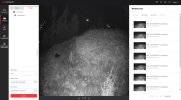
In terms of resolution, it is set to 2160p, but the Hik web interface downloads at 720p for some reason.

Send a screen capture of your "Picture Capture/Capture Parameters" page (similar to the one I posted above)...
 
Hi

Indeed, I discovered after I posted that actually it does remember what it already downloaded. That's still good.
If you would like and don't mind one more though for this great little app, perhaps you could allow the event type to be selectable also after connecting? It's not a big issue, just an idead.

Screen attached. I can download one pic (by selecting it), all pics from the page or - theoretically - all listed pics. But the last option never works, even let the PC run all night. Nonetheless, any option that does work downloads the pics at 720p despite the settings being at full size. Your app downloads them perfectly at 2160p
 

Attachments

  • hik pic screen.jpg
    hik pic screen.jpg
    513.3 KB · Views: 41
perhaps you could allow the event type to be selectable also after connecting? It's not a big issue, just an idea

I will look at that when next I upgrade the utility... maybe in the next month or so.

Nonetheless, any option that does work downloads the pics at 720p despite the settings being at full size. Your app downloads them perfectly at 2160p

That's strange and I can't understand how it could be??? Some bug/feature of the DS-2CD2T86G2-4I? Possibly fixed in latest firmware?

I think your camera is the same G5 series as mine:

Screenshot 2025-08-20 162101.png


I'm not sure what region you are in, but the newest Global English firmware for your camera seems to be:

Screenshot 2025-08-20 161950.png


I would try updating to this latest version available here:

https://www.hikvision.com/en/produc...-2cd2t86g2-2i-4i/?subName=DS-2CD2T86G2-4I+(C)
 
Back
Top