01304 827609 info@use-ip.co.uk Find us

Camera password.

scooby73466

Centurion!
Trusted Member
Messages
145
Points
28
Hikvision Hikvision DS-2CD2342WD-I 2.8mm Camera.

I am womdering if anyone could help me with what I hope is a simple query but which unfortunately I have no knowlege of. I recently acquired the above camera through a friend who has no knowledge of CCTV systems and when I plugged it into the rear of my NVR the system asked me for a password. I have no experience of passwords for cameras, my existing system was installed by the company that I purchased it from. This new addition looks almost identical to the 2 existing dome cameras on my system (Hikvision DS-2CD2342WD-I 4MP EXIR Turret Dome Camera, 4mm)

This latest addition may be a new canera in which case is there a standard password that is used or, if it a used camera, and I don't know if it is or not because it is in such good condition in it's original box, is there any way in which I can find out what the password is ?

And help and/or advice will be greatly appreciated.
 
You will probably have to do a factory reset of the camera. Usually the reset button is under the small cover (2 screws) where the memory card slot is. Disconnect the camera, then hold the button down while you connect it/power it. Keep holding the button for 30 seconds then release. The camera should then be factory reset.

You should be able to find guides online regarding installing a new camera.
 
Thank you very much @codlord Much appreciated. Is there a password set on new caneras during manufacture ? If not then whatever password is on this camera must have been initiated by someone else. The camera isn't installed yet but I made up a short length of RJ45 cable and tried it in the available slot on the NVR and so presumably if I do that again and follow your instructions I will get rid of the password ?
Thanks again.
 
There is no default password, as part of the install process you have to specify a password for the "admin" user. Most of my cameras are connected to PoE switches not NVRs so I usually setup cameras using the HikVision SADP tool first on a PoE switch / laptop / private network before then connecting to the proper network.

For connecting direct to NVR I think the process might be different, but I am not sure. But yes, you can reset the camera with a cable on the NVR - it just needs PoE power which the NVR will provide.
 
Hi @scooby73466

The DS-2CD2342WD-I may be new to you, but this model is actually quite old (roughly 10 years old).

Older models like this, especially when running old firmware, may still have old default passwords set.

These default passwords were made obsolete in the generation of cameras that were released after the 2xx2WD models; they were replaced by the password method that @codlord has explained above.

If your camera does have a default password set, it will be either 12345 or 123456.
 
There is no default password, as part of the install process you have to specify a password for the "admin" user. Most of my cameras are connected to PoE switches not NVRs so I usually setup cameras using the HikVision SADP tool first on a PoE switch / laptop / private network before then connecting to the proper network.

For connecting direct to NVR I think the process might be different, but I am not sure. But yes, you can reset the camera with a cable on the NVR - it just needs PoE power which the NVR will provide.
Thank you for that @codlord But it appears that the camera is quite old and may have one of the default passwords as mentioned by @Dan lower down. I will plug the camera in again and try his suggestions and come back with the result. In the meantime thanks for your help. It has been very much appreciated.
 
  • Like
Reactions: Dan
Hi @scooby73466

The DS-2CD2342WD-I may be new to you, but this model is actually quite old (roughly 10 years old).

Older models like this, especially when running old firmware, may still have old default passwords set.

These default passwords were made obsolete in the generation of cameras that were released after the 2xx2WD models; they were replaced by the password method that @codlord has explained above.

If your camera does have a default password set, it will be either 12345 or 123456.
Thank you for that @Dan. Our CCTV system was installed 9 years ago and so I can quite believe that the camera is that sort of age. but it does look as if it has never been installed. It looks just like new. I really appreciate your information about the default passwords and I will give it a try and report back. If neither work is there any way of finding out what the password actually might be ? And one more thing if I may - is it O.K. to plug the camera straight into the NVR or is it better to switch the NVR off, plug the camera in, and then switch the NVR back on again ?
 
  • Like
Reactions: Dan
Hi @scooby73466

There isn't really any way to identify the password a camera is currently using.

If the default passwords don't work, you will have to try a password reset and send the reset file to whoever supplied the camera or Hikvision support.

There won't be any issue plugging the camera into the NVR PoE port while the NVR is turned on.
 
Hi @scooby73466

There isn't really any way to identify the password a camera is currently using.

If the default passwords don't work, you will have to try a password reset and send the reset file to whoever supplied the camera or Hikvision support.

There won't be any issue plugging the camera into the NVR PoE port while the NVR is turned on.
Thank you so much for that @Dan that is really helpful. I will try installing the camera again tomorrow with a short lead and will report back.
 
Sorry Gents, it's me again ! I plugged the camera into the NVR and the following were the results. Firstly, this is where I got to on my stand alone monitor :

IMG_8612.JPG


I clicked on the Camera Password box and then tried the 2 sets of numbers on the keyboard that appeared and pressed the return key that is on the same keyboard but nothing happened.

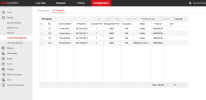
I then logged into the NVR from my desktop pc and got to here and then tried lots of the options but I couldn't seem to get anywhere.

Screenshot 2025-11-08 at 16-22-28 Configuration.png


Could anyone possibly help please ?
 

Attachments

  • IMG_8612.JPG
    IMG_8612.JPG
    4.6 MB · Views: 30
  • Screenshot 2025-11-08 at 16-22-28 Configuration.png
    Screenshot 2025-11-08 at 16-22-28 Configuration.png
    93.2 KB · Views: 34
Back
Top