01304 827609 info@use-ip.co.uk Find us

Help with DS-7204HGHI-SH DVR Firmware

kammy

Member
Messages
9
Points
3
Hi
Is there any upgrade to my firmware which I'm currently using

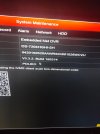
Model : DS-7204HGHI-SG
Firmware version : v3.3.2 Build 160314

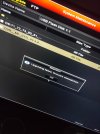
I have attached a picture of it helps

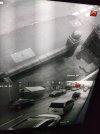
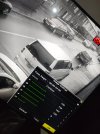
And also ever since I have used it it is black and white ..I could never get the colour picture on I don't know what is wrong

Thanks for reading
 

Attachments

  • 17388616491555073076108234458682.jpg
    17388616491555073076108234458682.jpg
    2 MB · Views: 175
  • 17388618711536882194458465045678.jpg
    17388618711536882194458465045678.jpg
    2.5 MB · Views: 137
Hi

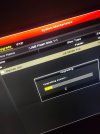
I've tried it and says upgrade failed, firmware mismatches

I've tried different versions on that link you sent me each one says same message

I've cleaned my camera even tried a new camera the one came with the oackage I didn't use still black and white..

Maybe I need a new box?

But thanks anyway
 

Attachments

  • 17389407114056484760869000534548.jpg
    17389407114056484760869000534548.jpg
    2 MB · Views: 122
  • 17389407439026641413965761435334.jpg
    17389407439026641413965761435334.jpg
    1.7 MB · Views: 118
Hi @kammy

Are you unzipping the firmware files before trying to load them on the NVR?

When you unzip the file download from the portal you should get a digicap.dav firmware file.
 
Hi @kammy

Are you unzipping the firmware files before trying to load them on the NVR?

When you unzip the file download from the portal you should get a digicap.dav firmware file.
Hi Dan
♂️♂️♂️♂️ Oopsie my bad
Hi @kammy

Are you unzipping the firmware files before trying to load them on the NVR?

When you unzip the file download from the portal you should get a digicap.dav firmware file.
Hi Dan

I'm so embarrassed can't believe I wasn't unzipping the files, school boy error from me

I managed to update to the latest firmware

Picture still showing black and white but atleast I have the latest firmware

Thank you so so much
 

Attachments

  • IMG20250210115217.jpg
    IMG20250210115217.jpg
    1.9 MB · Views: 124
  • Like
Reactions: Dan
Hi @kammy

Good to hear the firmware has worked.

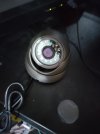
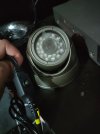
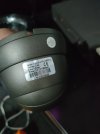
Can you please confirm the model number of the B&W camera?
Can you share screenshots from the DVR menus of the video/image settings for the B&W camera?
 
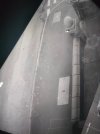
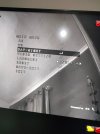
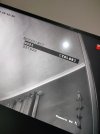
Hi I've sent you photos of the cameras..including camera 1 I've just connected with the switch..when I press the switch/control the menu comes up as shown in the image provided...
 

Attachments

  • 17391929328234914723083192204727.jpg
    17391929328234914723083192204727.jpg
    3.7 MB · Views: 100
  • 17391929898696163309631854216286.jpg
    17391929898696163309631854216286.jpg
    1.6 MB · Views: 106
  • 17391930121347930455435899336147.jpg
    17391930121347930455435899336147.jpg
    1.7 MB · Views: 109
  • 17391930437923525137485568211345.jpg
    17391930437923525137485568211345.jpg
    2.6 MB · Views: 101
  • 17391930539785574590281009341522.jpg
    17391930539785574590281009341522.jpg
    2.7 MB · Views: 114
  • 17391931837241214518904984107023.jpg
    17391931837241214518904984107023.jpg
    1.7 MB · Views: 106
Thanks @kammy

Under that 'Day/Night Mode' setting, what options does it give you? Is there an 'AUTO' option and have you tried it?
 
Thanks @kammy

Under that 'Day/Night Mode' setting, what options does it give you? Is there an 'AUTO' option and have you tried it?
Hi

Yes there is an auto option, I've tried it and I can here the camera click when it thinks it's dark and the red led lights come on and when I put the camera near the window clicks against with the red lights go off but both times still black and white
 
Thanks @kammy

Under that 'Day/Night Mode' setting, what options does it give you? Is there an 'AUTO' option and have you tried it?
Hi Dan

Just a quick update

I didn't hear from you for few days but since then after long two days of meddling managed to get my colour back on through the camera I unpacked

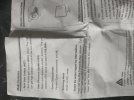
I found a manual or a instructions paper and followed some instructions.

It worked when I pressed the OSD button up or down for 5 seconds now I will try to find out which from AHD or CVI is best

I also managed to link the cameras to my smartphone through the hik connect app.

I didn't give up but Hard work pays off

Thanks again for helping

Kind regards

Kammy
 

Attachments

  • 17394539922687100796163194657870.jpg
    17394539922687100796163194657870.jpg
    2 MB · Views: 77
  • Like
Reactions: Dan
Back
Top