01304 827609 info@use-ip.co.uk Find us

Reset NVR and Cameras now not showins

samnorman21

Member
Messages
6
Points
1
Hi Folks,

I recently bought a house with a CCTV system that had been monitored.

I accessed the system and could see all the 8 cameras active yesterday, but could not access them directly on the app, so did a factory reset. My NVR kicked back up, I added a new password etc but now all the cameras are showing as offline :(

Any ideas what i can do to help bring the cameras back online?

My NVR device is DS-7608-NXI-12/8P/S
They cameras are all connected via as single ethernet cable which is connected with a POE Injector (I am not technical so may have got wording wrong).

The NVR shows up on my home router page http://192.168.0.1/ but cameras do not.
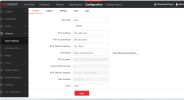
The cameras not showing on SADP, but can be seen on the config page (screenshots attached).

I suspect my cameras just aren't on the network, but no idea how to fix. PLEASE HELP :)
 

Attachments

  • Network NVR.png
    Network NVR.png
    145.2 KB · Views: 158
  • Cameras.png
    Cameras.png
    213 KB · Views: 148
Any ideas what i can do to help bring the cameras back online?
You've reset the NVR but the cameras are also password protected. Ideally you need to change the admin password of the NVR to what it was previously so that it can access the cameras and connect to them. If you don't know that password, unfortunately you're going to need to factory reset each camera individually. Depending on the model the camera may have a reset button that you can use; that's rarely convenient as you have to get to the camera to use it.
 
The 8 x POE ports on your NVR are in a separate, totally unique network (or "Broadcast Domain") from the LAN port connected to your home network.

The NVR does NOT copy (or "route") Ethernet packets from the 192.168.0.xxx network (your LAN port) to the 192.168.254.xxx network (8 x POE ports) or vice versa. The NVR is not a Level 3 switch or router.

To see your cameras on the 8 x POE ports, free up 1 x POE port, plug your SADP tool into that empty port, and re-run SADP. You should see the other 7 cameras still plugged in.

Too early for me to say why the cameras aren't seen by the NVR. I'd expect them to be there. Something else is going on. Plug & play vs manual configured ? I dunno. Provide a new screen shot of SADP (run from a POE port on the NVR) & maybe someone can help further.

EDIT...... JB probably nailed it with the password concern. :)
 
The 8 x POE ports on your NVR are in a separate, totally unique network (or "Broadcast Domain") from the LAN port connected to your home network.

The NVR does NOT copy (or "route") Ethernet packets from the 192.168.0.xxx network (your LAN port) to the 192.168.254.xxx network (8 x POE ports) or vice versa. The NVR is not a Level 3 switch or router.

To see your cameras on the 8 x POE ports, free up 1 x POE port, plug your SADP tool into that empty port, and re-run SADP. You should see the other 7 cameras still plugged in.

Too early for me to say why the cameras aren't seen by the NVR. I'd expect them to be there. Something else is going on. Plug & play vs manual configured ? I dunno. Provide a new screen shot of SADP (run from a POE port on the NVR) & maybe someone can help further.

EDIT...... JB probably nailed it with the password concern. :)
Hi, The way the system is wired there is only 1 POE used to connect with the NVR so lets of free ports to connect into.

When I plug my laptop into the NVR, then what do I do? Just run the SADP app or something else? Thanks In advance
 
Just run the SADP tool on your laptop....... with the laptop plugged into a spare NVR POE port.

IF you use the LAN port you'll get significantly different results.
Be sure to re-try it if you wish.

Post a clear screenshot from SADP (but to avoid confusion for the inexperienced, please do indicate which port the laptop is plugged into. Other people read this post too)

1 x cable plugged into an NVR POE port - AND you have 8 cameras hung off that - doesn't sound good, performance wise...... BUT with low res cameras maybe it can work. First things first though..... get your cameras connected/working.
 
Just run the SADP tool on your laptop....... with the laptop plugged into a spare NVR POE port.

IF you use the LAN port you'll get significantly different results.
Be sure to re-try it if you wish.

Post a clear screenshot from SADP (but to avoid confusion for the inexperienced, please do indicate which port the laptop is plugged into. Other people read this post too)

1 x cable plugged into an NVR POE port - AND you have 8 cameras hung off that - doesn't sound good, performance wise...... BUT with low res cameras maybe it can work. First things first though..... get your cameras connected/working.
Thanks! Realised it’s 6 not 8 cameras!


See attached the screenshot, I was plugged into POE 4. The cameras do at least show up :) so that’s a start…
image.jpg
 
ok, seems at one point the configuration had 8 cameras. But now you have 6.

The is my best guess, since all 6 cameras are connected to 1 x NVR POE port:
  1. figure out the full IP addresses for all 6 cameras. Extend the column in SADP so you/we can see the full IP address.
  2. disable all 8 x NVR POE ports D1-->D8
  3. enable NVR POE port "D1". Set the port to:
    • manual (not plug & play)
    • assign the next camera IP address as determined from your list of 6 above. e.g. D1 = 192.168.254.2 (?)
    • network mask --> 255.255.255.0
    • gateway --> 192.168.254.1
    • save it
    • if the camera fails to connect, it's likely a password issue that will need to sorted as JB outlined earlier, but ???.
  4. repeat step 3 for ports D2, D3, D4, D5, D6
Once all 6 ports are done, re-boot the NVR, & verify that all cameras connect correctly.
 
ok, seems at one point the configuration had 8 cameras. But now you have 6.

The is my best guess, since all 6 cameras are connected to 1 x NVR POE port:
  1. figure out the full IP addresses for all 6 cameras. Extend the column in SADP so you/we can see the full IP address.
  2. disable all 8 x NVR POE ports D1-->D8
  3. enable NVR POE port "D1". Set the port to:
    • manual (not plug & play)
    • assign the next camera IP address as determined from your list of 6 above. e.g. D1 = 192.168.254.2 (?)
    • network mask --> 255.255.255.0
    • gateway --> 192.168.254.1
    • save it
    • if the camera fails to connect, it's likely a password issue that will need to sorted as JB outlined earlier, but ???.
  4. repeat step 3 for ports D2, D3, D4, D5, D6
Once all 6 ports are done, re-boot the NVR, & verify that all cameras connect correctly.
Hi Sportster,

So I’ve uploaded a picture of the full IP addresses, and I’ve also received password reset files for each camera and completed those.

I’m not clear on how to disable all the NVR ports, nor step 3. Do I want the cameras to be on the same address as my laptop (see ipconfig picture attached)

Hoping someone can help :)

Sam
 

Attachments

  • IMG_1891.png
    IMG_1891.png
    1.5 MB · Views: 36
  • IMG_1893.jpeg
    IMG_1893.jpeg
    3.1 MB · Views: 35
My best guess is you're good to go. I must be missing somehting :).

The 6 x cameras seem to be known to the NVR's POE ports ok. I'm guessing you re-cabled the cameras directly to the NVR POE ports. The NVR's POE ports D1-D8 are likely set to plug & play.... which I imagine is fine for your installation.

At this point, my thinking is no need to do step 2 & 3. It appears:
  • your laptop is connected to your home 192.168.0.xxx network at 192.168.0.12
  • your default router is 192.168.0.1
  • the LAN Port of the NVR was set earlier to 192.168.0.254 network
  • your 6 cameras are on the 192.168.254.xxx network (as indicated by SADP screenshot)
  • the "internal" IP Address for the NVR is set as 192.168.254.1
  • this is all functioning as intended.
The 6 cameras "should" be online to the NVR by now.

If you're still encountering problems, I'm not seeing it. Is something cabled wrong ? Post a picture of all the cables connected into the NVR.

And then re-state what you feel is broken.
 
Hi,

So I’ve gone back and took some more pictures of SADP set up (attached); I note in pic 1926 my ipv4 dhcp says off, and him connect status shows off.

I have not touched cabling which was working fine before I did the reset. I just cannot see any cameras on my nvr, and on Hik-Connect app shows cameras offline.

I did email him support again uploading files to reset cameras. I’m not sure what there instructions mean, is my laptop on the right LAN?

One thing I noticed when plugging my laptop into the NVR is that the internet drops on my laptop so I can’t open the cameras from sadp via web browser, and my work laptop can’t have 2 connections.

Any suggestions welcome.
 

Attachments

  • IMG_1925.jpeg
    IMG_1925.jpeg
    5.5 MB · Views: 30
  • IMG_1926.jpeg
    IMG_1926.jpeg
    4.4 MB · Views: 28
  • IMG_1929.png
    IMG_1929.png
    1.1 MB · Views: 33
  • IMG_1928.png
    IMG_1928.png
    530 KB · Views: 32
First... an explanation of the networks in play:

Your DS7608NIX-I2/8P/S has 2 networks or 2 LANs:
  • 1st network is the LAN port.... generally this is cabled into your primary home network
  • 2nd network is the NVR's POE ports (in your case 8 ports)
  • these 2 networks are independent, thus, if you want the full HIK picture, you must run SADP twice.
    • connect laptop to 1st network (using WiFi or a direct cable to your router) & run SADP
    • connect laptop to 2nd network (using a direct cable into a spare NVR POE port) & run SADP again
SADP run on the 2nd network, seems fine. Screenshot showed 6 cameras + NVR - everything is as expected on the 2nd network.
SADP on the 1st network might be ok. Would need to see a screenshot. From your description, I'd expect to see only the NVR on this network.

Second... but you're claiming the cameras don't show on the NVR.

On the NVR, the config pages of interest should be POE Settings, and Video Device. (Due to firmware differences, those page names may not be exact, but should be close enough). Verify the POE status for each camera. Plus verify the Camera Channels D1-D8.... the 6 cameras should show some kind of status and provide an indication why they are not online to the NVR. Of course, the 2 remaining channels should show nothing connnected.
 
Last edited:
First... an explanation of the networks in play:

Your DS7608NIX-I2/8P/S has 2 networks or 2 LANs:
  • 1st network is the LAN port.... generally this is cabled into your primary home network
  • 2nd network is the NVR's POE ports (in your case 8 ports)
  • these 2 networks are independent, thus, if you want the full HIK picture, you must run SADP twice.
    • connect laptop to 1st network (using WiFi or a direct cable to your router) & run SADP
    • connect laptop to 2nd network (using a direct cable into a spare NVR POE port) & run SADP again
SADP run on the 2nd network, seems fine. Screenshot showed 6 cameras + NVR - everything is as expected on the 2nd network.
SADP on the 1st network might be ok. Would need to see a screenshot. From your description, I'd expect to see only the NVR on this network.

Second... but you're claiming the cameras don't show on the NVR.

On the NVR, the config pages of interest should be POE Settings, and Video Device. (Due to firmware differences, those page names may not be exact, but should be close enough). Verify the POE status for each camera. Plus verify the Camera Channels D1-D8.... the 6 cameras should show some kind of status and provide an indication why they are not online to the NVR. Of course, the 2 remaining channels should show nothing connnected.
Hi Sports!

Thanks for your help. See attached picture of sadp setting when laptop is plugged direct into router. Anything of note?

I went on to camera settings through the web browser plugged into my laptop and shows the attached.

Thanks Sam
 

Attachments

  • IMG_1963.jpeg
    IMG_1963.jpeg
    3.5 MB · Views: 34
  • IMG_1962.jpeg
    IMG_1962.jpeg
    3.9 MB · Views: 31
  • image.jpg
    image.jpg
    3.2 MB · Views: 30
The latest pics show multiple config errors & problems.

At some point it seems the cameras have been moving from the NVR's POE ports to the home "router" network (& maybe vice versa).... this creates a lot of confusion. This may have been done by moving cables or adding cables. Or do you have other switches in the mix ? I can't tell what triggered this. Please don't be doing this..... or I'm mis-interpreting all that I'm seeing.

So, this leaves a mess to sort out. Breaking it down:

NVR LAN Port
  • the NVR LAN port has gone from non-DHCP in March 2025 to DHCP now. It last shows an IP Address --> 192.168.0.25, but the IPv4 Gateway is NOT populated. Makes no sense. Probable fix:
    • re-boot the NVR. Then
    • post a screenshot of the NVR's TCP/IP config page. Show the entire web page.... including the internal NVR address.
  • the physical NVR LAN port should be cabled directly (or via a switch) to the router.
Cameras
  • IP Camera page -- Channels D1-D8 are all screwed up. This config page needs a lot of work, but first:
    • ensure the cameras are cabled the way you intend to leave them. Then:
      • re-boot the NVR
      • post a pic of ALL 9 ports from the back of the NVR. (I need to understand "exactly" how things are physically cabled)
      • post a screenshot from the POE Channel page (I need to understand.... plug & play or manual for all 8 POE ports)
      • re-post a screenshot from SADP (with SADP connected to a spare NVR POE port)
        • please ensure all key columns are unmasked (in particular IP Address, Subnet Mask, IPv4 Gateway, IPv4 DHCP)
  • and we figure out next steps
 
Last edited:
Back
Top