Help configuring Hikvision IP intercom system – 4 blocks, 3 entrances per block + 2 external entrances (total 69 apartments)
Message:
Hello everyone,
I need some help configuring a Hikvision IP video intercom system (DS-KD series) for a residential complex, and I want to make sure the network logic and device configuration are set correctly.
Here’s the situation:
What I need:
Questions:
Any example configurations, screenshots, or best practices for similar multi-building setups would be really appreciated.
Thanks in advance for any help!
Fernando Pereira
Message:
Hello everyone,
I need some help configuring a Hikvision IP video intercom system (DS-KD series) for a residential complex, and I want to make sure the network logic and device configuration are set correctly.
Here’s the situation:
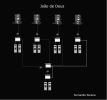
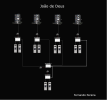
- There are 4 buildings (blocks) in total.
- Each block has 3 entrances, each with a DS-KD7003/04/06EY main unit and 2 sub modules (button panels).
- There are also 2 external entrances at the street level, which should call all apartments in all 4 buildings.
- In total, there are 69 apartments across the 4 blocks.
What I need:
- Each block’s 3 entrances should only call the apartments within that same block.
- The 2 external (street) entrances should be able to call any apartment in any building.
- All devices are networked via DS-KAD706Y-S PoE switches in a star topology.
- Each apartment has indoor monitors (Hikvision IP monitors).
Questions:
- How should I configure the Main Door Station vs Sub Door Station roles for each entrance?
- Should each block have its own “main door station” defined with a separate building number, and the two external ones configured as “global door stations”?
- How should I set the Building No., Unit No., and Room No. so that calls from each entrance go only to the correct block’s monitors?
- Is it possible to configure the two external entrances to call all apartments (broadcast call) while the local entrances remain limited to their block only?
- Any advice on recommended IP addressing and linking between door stations (via “Linked Network” or “Main Door Station IP”)?
Any example configurations, screenshots, or best practices for similar multi-building setups would be really appreciated.
Thanks in advance for any help!
Fernando Pereira