
01304 827609 info@use-ip.co.uk Find us

Hikvision NVR Channel No's sorting

Marco Hill

Centurion!
Trusted Member
Messages
106
Points
18
Afternoon,

Does anyone happen to know the best way to sort out the camera devices.

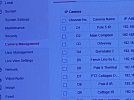
Do I simply go to select the camera and do this under modify.

I am trying to view my cameras in a certain sequence on Hik-connect for everyone that is connected and I believe I have to do this under camera management
and do the above.

Thanks a lot

I hope my question makes sense.
 

Attachments

  • WhatsApp Image 2022-03-27 at 4.51.49 PM.jpeg
    WhatsApp Image 2022-03-27 at 4.51.49 PM.jpeg
    122.3 KB · Views: 956
I don't think you can change the order they load in Hik-connect... cameras just load up in the "Channel No." order

I've tried rearranging them in Hik-connect but when you restart the app they revert to the channel number order
 
@ChrisCCTV thanks. Do you mean in the camera or on the NVR?

@johnfitzy yes I have that exact problem you mention. I messed around with it today again but could not figure it out.

I think one could delete all the cameras and than import them one by one again to get the correct sequence if I am not mistaken.
 
If Hikvision NVR has a web view you can get the camera action in the size you want and the sequence you want by creating a small client.
 
Hi Marco,

That screenshot I showed was in the camera's webpage. I don't use an NVR personally so not sure how this works with an NVR.
 
Hi Marco,

That screenshot I showed was in the camera's webpage. I don't use an NVR personally so not sure how this works with an NVR.
Can you provide one ip of one Hikvision NVR web camera . I would like to view the code and see if it has a transversal path vuln on images and create a client.
 
Can you provide one ip of one Hikvision NVR web camera . I would like to view the code and see if it has a transversal path vuln on images and create a client.

I would NOT respond to this request. @Dan is this even a proper request to make?
 
Back
Top