01304 827609 info@use-ip.co.uk Find us

Senzor Granularity in Hik-Connect

apashi

Centurion!
Trusted Member
Messages
106
Points
18
I have a question:
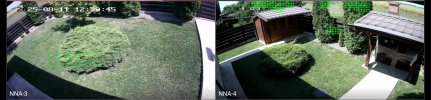
After I activated HIGHLIGHT MOVING OBJECTS in Hik-Connect application, I was surprised to see a difference in live view of my 4MP identical cameras. The left camera is showing bigger green squares, and the right camera is showing smaller squares.
Is this normal or abnormal? Is the the effect of some camera configuration I did different?
 

Attachments

  • Screenshot_20250811_133047_Hik-Connect.jpg
    Screenshot_20250811_133047_Hik-Connect.jpg
    298.6 KB · Views: 56
  • Screenshot_20250812_143934_Hik-Connect.jpg
    Screenshot_20250812_143934_Hik-Connect.jpg
    153.7 KB · Views: 56
Hi @apashi

If both cameras are the same model, I would not expect the images they capture of the same scene to look so different.

Can you please confirm the model number of both of these cameras?
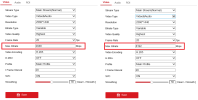
Can you share screenshots of the video/stream settings for both cameras?
 
Attached requested info.

So the cameras are identical and Video Config is very similar.

Only difference I see is the Max Bitrate. I have to add that both cameras are connected via WIFI only.
Can this be the cause of different square sizes?

I did configured them identical (as the one with small squares), but there was no change. :(
 

Attachments

  • Basic-Info.png
    Basic-Info.png
    38.3 KB · Views: 55
  • Video-Config.png
    Video-Config.png
    35.4 KB · Views: 51
Hi @apashi

Have you increased the max. bitrate from 2048 to 8192 so that both cameras are configured the same?
After doing this, are the images still significantly different?
 
Hi @apashi

Have you increased the max. bitrate from 2048 to 8192 so that both cameras are configured the same?
After doing this, are the images still significantly different?
I did exactly that and no difference in Hik-Connect.
I also checked the Motion Config and Image Config, all of them are the same for both cameras.
 
SOLVED: if you change the Camera Web Interface -> Video/Audio -> Sub-Stream -> Max Bit Rate to highest allowed value, after restart, the square size in Hik-Connect, will become smaller. I tried it even on 2MP camera and work perfect.
Not sure how this will affect Motion Detection function, but my idea is that this will increase the granularity and sensitivity of Motion Detection capability. Will put ot ot test from now on.
What is your impresion? Would you try this for yourself? Maybe you will be faster on identifying the benefits.
Thanks for support in this topic.
 
  • Like
Reactions: Dan
Some additional findings:
- 1 big square is divided in 9 small squares, in a 3x3 pattern
- the minimum highlighted area remans the equivalent of a big square
- from this big square now they can overlap with other big square area, so the contour of in motion object is now more refine and precise

I am still trying to find how this increased motion detection capability is affecting the motion sensitivity.
 
Back
Top