
01304 827609 info@use-ip.co.uk Find us

DS-7204HQHI-K1 Firmware Update Not Available

apashi

Centurion!
Trusted Member
Messages
106
Points
18
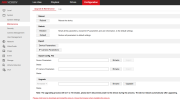
I have this problem with my DVR DS-7204HQHI-K1 running version v3.5.23 build171109.

I tried to update the firmware, but the Firmware Upgrade button is greyed out. :(

Any idea why this is happening? Is there a way around this?

Thanks!
 

Attachments

  • DS-7204HQHI-K1-Firmware-Update-Not-Available.png
    DS-7204HQHI-K1-Firmware-Update-Not-Available.png
    78.9 KB · Views: 116
  • DS-7204HQHI-K1-v3.5.23-b171109.jpg
    DS-7204HQHI-K1-v3.5.23-b171109.jpg
    53 KB · Views: 99
I have this problem with my DVR DS-7204HQHI-K1 running version v3.5.23 build171109.

I tried to update the firmware, but the Firmware Upgrade button is greyed out. :(

Any idea why this is happening? Is there a way around this?

Thanks!
What problem? It's greyed out because 'firmware' it's not a selectable/changeable field. Although it shows a s a dropdown selection, even if you can click it, it does nothing anyway. You use the 'browse' to navigate to the file and 'upgrade' once selected. Occasionally when you browse to the file and select it the path doesn't appear in the box and you may need to repeat 'browse' until it does.
 
What problem? It's greyed out because 'firmware' it's not a selectable/changeable field. Although it shows a s a dropdown selection, even if you can click it, it does nothing anyway. You use the 'browse' to navigate to the file and 'upgrade' once selected. Occasionally when you browse to the file and select it the path doesn't appear in the box and you may need to repeat 'browse' until it does.
for me, the BROWSE button doesn't work at all, that's the problem I have.
 
for me, the BROWSE button doesn't work at all, that's the problem I have.
Install the plugin, or use iVMS4200 or try a different browser. I've had that with older devices several times and it's simply browser compatibility. iVMS4200 is your best bet. Once it's on newer version it'll likely work using a browser.
 
Install the plugin, or use iVMS4200 or try a different browser. I've had that with older devices several times and it's simply browser compatibility. iVMS4200 is your best bet. Once it's on newer version it'll likely work using a browser.
You were right, i was able to try again and successfully updated the firmware to latest version 4.25.001
 
You were right, i was able to try again and successfully updated the firmware to latest version 4.25.001
I’ve had similar issues a few times and most recently it was one of the newer NXI-K1 NVR models. 4.25.001 will be the last version for that HQHI-K1 DVR as it’s discontinued/EOL
 
Back
Top