01304 827609 info@use-ip.co.uk Find us

Fault with HikvisionDS-2CD2342WD-1 4MP EXIR

If I have to buy a new camera I shall buy one as close to the one that I've got spec. wise but will there be a palava in getting it up and running on my system or will it be just as simple as plugging it in and it will work immediately ?

If the camera turns out to be the culprit, we'll try to find a similar new one that will mount easily on that existing junction box cover... it shouldn't be a big deal to get it up and running.

If I were in your shoes, I'd be hoping it's the camera that's bad... most of the time swapping out a camera is a lot easier than re-running a new cable to the camera location!
 
If the camera turns out to be the culprit, we'll try to find a similar new one that will mount easily on that existing junction box cover... it shouldn't be a big deal to get it up and running.

If I were in your shoes, I'd be hoping it's the camera that's bad... most of the time swapping out a camera is a lot easier than re-running a new cable to the camera location!
Yes, I am hoping that it is the camera because we built the house 12 years ago and the cabling for the cameras was placed internally during the building rater than round the outside of the house. And we had the outside of the house painted a couple of months ago and I can see a couple of things that I wasn't aware of. I have seen a couple of the cable clips that hold the cable where it runs along the soffits to the camera have come unstuck (they are the glued type, not the ones with small tacks to fix them) They used heavy duty sanders to prepare all the woodwork prior to the painting and I am wondering if they got a bit too close to the cabling for this particular camera somewhere .
 
UPDATE Took the camera off today and with a short piece of cable plugged it into the nvr. The camera worked fine !!! Yet another question if I may please ? Is the cable a CAT5E cable and if not what is it please ? Any help much appreciated.
 
Is the cable a CAT5E cable and if not what is it please ?

Can't be sure... it probably is, but pretty much any Ethernet cable would work fine, CAT5, CAT5E, CAT6, CAT7... so I wouldn't worry about that too much.... anything that looks like an Ethernet cable should work!

we had the outside of the house painted a couple of months ago and I can see a couple of things that I wasn't aware of. I have seen a couple of the cable clips that hold the cable where it runs along the soffits to the camera have come unstuck (they are the glued type, not the ones with small tacks to fix them) They used heavy duty sanders to prepare all the woodwork prior to the painting and I am wondering if they got a bit too close to the cabling for this particular camera somewhere .

If the cable were damaged during the woodwork, I think you would have seen the failure right away...

I think most of the time it's one of the data plugs on the cable, not the cable itself. I've had IP cameras 10 years or so, but have only had 2 data plugs fail... one inside where the cable connects to the NVR because I yanked it a bit too hard and one outside because of corrosion... I'll assume you had not been moving the NVR around when the camera failed so it's probably not the connector inside... but it won't hurt to try plugging the cable in and out of the NVR several times to possibly "clean" the connections there...

Then go outside and inspect the connector on the cable there... look closely to see any corrosion... try plugging the cable into the camera several times to possibly clean the connection there... I've seen others suggest using dielectric grease on the connection:

Permatex 22058 Dielectric Tune-Up Grease

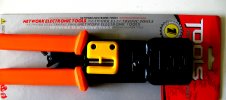
If the camera still doesn't work, you need to either re-run a new cable (not fun) or try putting new connectors on it... Here is the tool/connectors I have used:

Klein Tools 80024 Ratcheting Data Cable and RJ45 Crimp Tool with CAT6 Plug 50-Pack, Pass Thru Installation Tool Kit

Here's a video explaining how to use the tool:


You can find a cheaper tool and connectors but the Klein Pass Thru tool is excellent quality and easy to use. Too bad we're not neighbors, I've got 48 connectors ready to go :)

IMG_4339.JPG


Let me know what you think!
 
Can't be sure... it probably is, but pretty much any Ethernet cable would work fine, CAT5, CAT5E, CAT6, CAT7... so I wouldn't worry about that too much.... anything that looks like an Ethernet cable should work!


If the cable were damaged during the woodwork, I think you would have seen the failure right away...
Let me know what you think!
Thank you so much for all that. Because the camera is working O.K. when plugged into the NVR with a short length of cable I was going to try and follow the cable where I could throughtout the loft space. I bought a cable connector tool when I had a problem with the PTZ camera.
Connector.jpg
It's a few years since I used that and I can't find the instructions but there will be something on YT I expect. I have plenty of connectors and the shrouds for them and even a couple of waterproof connectors. I've put the scaffold tower away so I'll have to get that thing out again I expext.
IMG_8398.JPG
 

Attachments

  • Connector.jpg
    Connector.jpg
    1.8 MB · Views: 38
Good! I'm pretty sure if you replace that connector on the cable outside you will be good!
Thanks for that . I'll have a look round to see if I have got a manual somewhere or try and find something on the net. I have forgotten how to use ir. I may need some help !!!
 
I have just found this in the box with the plug wiring clamp. Could anyone tell me which is the correct way to wire such a camera please ? Any help and/or advice is much appreciated.

Plug wiring01.jpg
 
Could anyone tell me which is the correct way to wire such a camera please ?

From google:

"You can use either T568A or T568B for Cat 6 wiring, but the most important factor is consistency—both ends of a single cable must use the same standard."

So, if you were changing both ends of the cable, it would not matter which one you use, as long as they're the same on both ends... I think you should try changing the outdoor connector first, in which case you should visually inspect the existing connecter... you should be able to see which standard is being used... look for the location of the green and orange pairs.

If changing the outdoor connector does not work, then try the indoor connector as well.
 
From google:

"You can use either T568A or T568B for Cat 6 wiring, but the most important factor is consistency—both ends of a single cable must use the same standard."

So, if you were changing both ends of the cable, it would not matter which one you use, as long as they're the same on both ends... I think you should try changing the outdoor connector first, in which case you should visually inspect the existing connecter... you should be able to see which standard is being used... look for the location of the green and orange pairs.

If changing the outdoor connector does not work, then try the indoor connector as well.
Mmmm. That all makes sense. Thank you. I hadn never thought that it mght be the indoor connector into the NVR.. But there are a couple of other things that are concerning me. One is that where the cable comes out of the brickwork of the ridge and heads down to the camera there is what looks like a large bulge in the cable and I am wondering if when the system was being installed that a joint was needed in the cable. If it is a joint it has got something round it but it is not a good place to have a joint.
The other annoyance is that the cable goes through the loft and there is quite a large areaarea that I do not have access to. I have only got one trap door and that doesn't allow me to get into at least half of the loft.
 
where the cable comes out of the brickwork of the ridge and heads down to the camera there is what looks like a large bulge in the cable and I am wondering if when the system was being installed that a joint was needed in the cable. If it is a joint it has got something round it but it is not a good place to have a joint.

I'm not sure what you mean by a bulge... if you bend the cable 90 degrees or more you might see a bulge, but if the cable is working after the bend, it will probably continue to work... if you could take a picture of the bulge?... but I still think that cables don't fail unless something is "moved"... the connectors on the other hand can fail when "moved" or corroded.
 
I'm not sure what you mean by a bulge... if you bend the cable 90 degrees or more you might see a bulge, but if the cable is working after the bend, it will probably continue to work... if you could take a picture of the bulge?... but I still think that cables don't fail unless something is "moved"... the connectors on the other hand can fail when "moved" or corroded.
I took some photos. when I was up the tower but I have taken it all down now and those that I took don't show the bulge very well. I am going to re-wire the plug that goes into the NVR in the morning and if that doesn't cure the problem I shall probably get the tower out again if it's not going to be too windy over the weekend.
 
Good stuff!
I am having difficulties re-wiring the RJ45 plugs which is rather strange because I have done it before. I've got the crimper, plugs, etc. but it just seems so fiddly this time.
On another issue, I have acquired another similar Hikvision camera to be used for testing purposes and when I plug it into the back of the NVR the systen asks for a password. I have logged into the NVR but can't find them and I don't think I have ever seen them. Can anyone tell me how I find out what the password is for any one camera please ?
 
I am having difficulties re-wiring the RJ45 plugs which is rather strange because I have done it before. I've got the crimper, plugs, etc. but it just seems so fiddly this time.

If you have an extra/spare short cable that is working and extra connectors, you could try/practice by replacing one of the connectors on that... then test the camera with it to see if what you did worked... if not, try again until you can successfully crimp the connector on the extra test cable.

On another issue, I have acquired another similar Hikvision camera to be used for testing purposes and when I plug it into the back of the NVR the systen asks for a password. I have logged into the NVR but can't find them and I don't think I have ever seen them. Can anyone tell me how I find out what the password is for any one camera please ?

You would set the password for the new camera when it is activated.

I'd hold off on testing that new camera until you get the one already in PoE port 1 working... don't want to disrupt anything else or introduce new variables. But, if you do want to test it now, try testing it using your unused PoE port 4 so nothing changes on PoE port 1 where you are trying to get the other camera working. :)
 
Mmmm. I have already jumped the gun as far as trying to test the "new" camera. I used a short lead the same as I used when testing the one that I took down from the house. And I got the "Password Required" message. I did log into the NVR but didn't change anything. I hope that I haven't jiggered anything up ! I did buy 10 metres of new Cat5e cable last week and have been practising with putting new RJ45 plugs on the end of it. I watched numerpus videos on YT but just couldn't hold the wires in the right position and push them through the plug. I think it's because of my age and eyesight, even though I was working through an illuminated magnifying g;ass on a stand. And so I cheated ! I uncovered more tha the normal length of outer covering on the cable, untwisted the wires, straightened them, and then pushed them through the plug, one at a time and in the right order starting with the brown on the right (with the retaining clip on the underside) I had freed enough length of the wires so that when I had pushed them through the holes they were sticking out of the other side of the plug by about 2 inches which meant that I could hold them tight while I kept pushing the remaining wires through. When I had got them all through I checked that tey were in the right order and then I was able to get them all through the relevant crimping tool hole and crimp them and the excess wires were cut off.
It's all a bit of a fiddly job and I would have thought that there could have been an alternative.
 
Mmmm. I have already jumped the gun as far as trying to test the "new" camera. I used a short lead the same as I used when testing the one that I took down from the house. And I got the "Password Required" message. I did log into the NVR but didn't change anything. I hope that I haven't jiggered anything up !

Should be fine... just try connecting the original outside camera 1 to the NVR PoE port 1 with a short cable again to make sure nothing has changed and the camera still works.

And so I cheated ! I uncovered more tha the normal length of outer covering on the cable, untwisted the wires, straightened them, and then pushed them through the plug, one at a time and in the right order starting with the brown on the right (with the retaining clip on the underside) I had freed enough length of the wires so that when I had pushed them through the holes they were sticking out of the other side of the plug by about 2 inches which meant that I could hold them tight while I kept pushing the remaining wires through. When I had got them all through I checked that tey were in the right order and then I was able to get them all through the relevant crimping tool hole and crimp them and the excess wires were cut off.

That's not cheating!... you must have pass-thru connectors which are easier to work with (I used those too):

Screenshot 2025-09-15 190645.png
 
Should be fine... just try connecting the original outside camera 1 to the NVR PoE port 1 with a short cable again to make sure nothing has changed and the camera still works.


That's not cheating!... you must have pass-thru connectors which are easier to work with (I used those too):

View attachment 13235
Yes, I will check the existing camera in it's port on the NVR again. And yes, I do have pass-through connectors but I still find it too fiddly to do it like all the videos show how it should be done. I have done it before like that but a few years ago now. Why can't someone invent a connector with a hinged flap that opens, you lay the cables into the relevant grooves, close the flap and put it into the crimper ? Do you think I should put a patent on that idea ? (I can't get the Smilies to open this morning)
 
Back
Top