01304 827609 info@use-ip.co.uk Find us

Firmware Latest Hikvision Firmware for G5 Series Cameras (DS-2CD2xx3G2 2xx6G2(C) 2xx7G2(C) 3xx7G2(C)) - V5.7.10_SP build220830

JB, the single gang boxes are located at entry doors where a doorbell would be installed. Wall mounted. With that said, I think the mini dome is the only good hikvision option to put in those areas. I live in Southern California so we don't get much rain, but there will be direct sun beating on one of them for most of the day which will probably reduce it's life expectancy.
YMMV but I don't think the images will be much use due to their position. If the cameras are looking straight out from a low mounting height (4-5 feet by what you're describing); in order to capture anyone approaching, the camera will be angled such that you're getting a lot of the sky visible. That'll result in the image being overly backlit and while you can tweak the settings to improve the image, it'll be far from ideal. The sun itself hitting the glass can cause awful glare. It's always best to position cameras at a height where they can be tilted down so that as much of the sky can be avoided in the view. Doorbell cameras can sometimes be OK as the caller (which is all the camera needs to capture) will block a lot of the background out while stood in front of it and the lens area is small so isn't impacted quite so much by direct light.
 
YMMV but I don't think the images will be much use due to their position. If the cameras are looking straight out from a low mounting height (4-5 feet by what you're describing); in order to capture anyone approaching, the camera will be angled such that you're getting a lot of the sky visible. That'll result in the image being overly backlit and while you can tweak the settings to improve the image, it'll be far from ideal. The sun itself hitting the glass can cause awful glare. It's always best to position cameras at a height where they can be tilted down so that as much of the sky can be avoided in the view. Doorbell cameras can sometimes be OK as the caller (which is all the camera needs to capture) will block a lot of the background out while stood in front of it and the lens area is small so isn't impacted quite so much by direct light.
Got it, I'll try to see if I can mount it up higher. Thanks again.
 
1 - If you want the static white light on event, then yes you need to get the models ending LU (2347/2387) but as stated above they're not an old model. They are current.

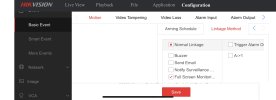
The LSU/SL liveguard model can also do the static white light on event (normally on) or flash with different are varying speeds

flashingalarm.jpg
 
The LSU/SL liveguard model can also do the static white light on event (normally on) or flash with different are varying speeds

View attachment 9224
I hadn't noticed the 'normally on' setting for the strobe. That's enabling a different LED as opposed to the LED's used for illumination/exposure assistance. I'm not sure whether the output and spread of the single strobe light LED is similar to the illuminators but as there's only one, it'll probably only provide half the illumination for the image and it's not the same white. For those who are using the White Light on event to provide a usable image while leaving teh LED disabled otherwise, it won't produce the same effect.
 
Last edited:
I updated to the latest firmware 5.7.13 and the light linkage on motion stopped working. To get it working again I had to enable full screen monitoring in the NVR. I am currently using the 2387 cameras with the 7608 NVR
 

Attachments

  • IMG_6659.jpeg
    IMG_6659.jpeg
    219.6 KB · Views: 250
I updated to the latest firmware 5.7.13 and the light linkage on motion stopped working. To get it working again I had to enable full screen monitoring in the NVR. I am currently using the 2387 cameras with the 7608 NVR
Check what your build date of 5.7.13 you're on and update again if necessary. The original version was 5.7.13_230403 and a newer build of _230504 has been released to fix a few bugs.
 
Check what your build date of 5.7.13 you're on and update again if necessary. The original version was 5.7.13_230403 and a newer build of _230504 has been released to fix a few bugs.
Thankyou for this. Having just checked it was the one released in May that I installed
 
Thankyou for this. Having just checked it was the one released in May that I installed
They're often released some time after the build date (_YYMMDD) so always be sure it's the newest build date from the product page on the Hikvision website (rather than looking at date added)
 
Last edited:
Hello, can someone help me to find firmware 5.7.10 build 220830 but not the one from the Netherlands portal ?

Thanks.
 
Hi @mano

As far as we are aware, the only version of the 5.7.10 build220830 firmware is the one available on the Hikvision EU portal.

Is there a specific reason you need this firmware version?
 
Thanks for the answer.
I only find the one on the Netherlands portal, but it is not working with my camera. The UK portal is empty now. There are only the latest versions available.
I want to DOWNGRADE from V5.7.19 build 241207. I know how to do that. I just need the .dav file.
The problem is that the camera is not detecting small animals lite cats, dogs, squirrels, hedgehogs in line crossing detection. I've already tried all the options.
The old version (5.7.10 build220830) didn't have this problem.
 
Last edited:
Thanks for the answer.
I only find the one on the Netherlands portal, but it is not working with my camera. The UK portal is empty now. There are only the latest versions available.
I want to DOWNGRADE from V5.7.19 build 241207. I know how to do that. I just need the .dav file.
The problem is that the camera is not detecting small animals lite cats, dogs, squirrels, hedgehogs in line crossing detection. I've already tried all the options.
The old version (5.7.10 build220830) didn't have this problem.
You want 5.7.15 for that. All versions after that won’t work for dual VCA search of anything other than Human/Vehicle. Although if you log into the camera itself on 5.7.19 there is a selection for ‘other’ as well as human and vehicle. Selecting that may get it working
 
Last edited:
You want 5.7.15 for that. All versions after that won’t work for dual VCA search of anything other than Human/Vehicle. Although if you log into the camera itself on 5.7.19 there is a selection for ‘other’ as well as human and vehicle. Selecting that may get it working
Hello and thenks for the reply.
Do you have this firmware 5.7.15 or can you give me a link to download it ?

Thanks
 
Hello and thenks for the reply.
Do you have this firmware 5.7.15 or can you give me a link to download it ?

Thanks
There were three different build versions so you want the newest. I’ll find a link and post it but if not I can share a Dropbox link to mine

Here you go:

5.7.15
 
There were three different build versions so you want the newest. I’ll find a link and post it but if not I can share a Dropbox link to mine

Here you go:

5.7.15
Thank you, will try it soon.

In 5.7.19 ‘other’ doesn't work in my case. Detect only Human and Vehicles also.
 
Last edited:
My gen2 colorvu's have been on 5.7.14 for a couple years now, primarily because Hik broke dual vca/non human and vehicle detection on the latter versions. Surprised 5.7.19 is still broken and it's been out for a decent while now. @JB1970 have you ever reported the issues to 5.7.19 to them? Looks like that was the last ever update for the gen 2 models and they're not more interested in the hybrid and gen3 models

Coincidentally I had been playing around with line crossing over the past month and noticed that birds/squirrels don't seem to trigger this. I set region entrance up a week ago and unchecked human/vehicle and notched sensitivity up to 100 but animals still don't trigger the zone. I'll try 5.7.15 and see if this resolves the issue
 
Back
Top