
Navigation
Install the app
How to install the app on iOS
Follow along with the video below to see how to install our site as a web app on your home screen.
Note: This feature may not be available in some browsers.
More options
You are using an out of date browser. It may not display this or other websites correctly.
You should upgrade or use an alternative browser.
You should upgrade or use an alternative browser.
M-Series Firmware V5.04.060_250523 Release
- Thread starter kraven
- Start date


- Messages
- 4,111
- Points
- 113
Yes @Paesano mentioned this. It is available on the product page for the recorder but the previous version still currently shows when doing a firmware search. I'll load it a little later.
Last edited:
- Messages
- 4,111
- Points
- 113
yeah same - nothing obvious. I no longer have a Hik intercom so don't know whether the issues I previously had with mine are resolved.Just installed on my DS-7616NI-M2/16P.... everything working as before install... I don't see any changes yet...
From the recent thread on "scrubbing":
Weird coincidence this is fixed? I can now scrub on all cameras! Even multiple cameras at the same time
Scrubbing only works at night on the 2347G3 and a little during the day. I can't scrub on the others day or night.
I just tested... the only camera I can scrub with is the older 3MP DS-2DE4A320IW-DE PTZ
Weird coincidence this is fixed? I can now scrub on all cameras! Even multiple cameras at the same time
A few observations on this release (some are carry-overs from past releases):
Environment: Chrome Browser on WIN with DS-7616NI-M2 @ V5.04.060 build 250523
Virtual Host - (new)
Environment: Chrome Browser on WIN with DS-7616NI-M2 @ V5.04.060 build 250523
Virtual Host - (new)
- Virtual Host is enabled but there's no ability to use it.
- at one time, there was a clickable link to get to my cameras. With this release, I'm no longer seeing a clickable link.
- it may be related to my specific setup with a DS-7616NI-M2. I don't really need Virtual Host as I can access my cameras directly (without going thru the NVR)
- just seems odd that the capability disappeared
- to access...... Maintenance and Security --> Device Debugging --> Network Diagnosis
- 10% of the panel is in Chinese language (see attached pics)
- click on the START button ----- and it goes into "Self-Detecting...." indefinitely
- one needs to bust out & re-login to the NVR to continue browsing around
- the NVR's log contains no information on this event
- not a good look for a new function (whatever this function "really" does)
- BTW, if it matters, I didn't see this panel on the NVR GUI
- Event Markers are incorrectly aligned with the actual video timestamp. i.e. Event Markers are mis-aligned by the DST bias.
- e.g. intrusion detection Event Marker is at 07:48:05. Actual video is at 06:48:05. 06:48:05 is correct.
- this was highlighted to HIK over a year ago & is still outstanding
- AFAIK, only occurs when DST is in effect in your time zone.
- Event Markers seem to be correct on the NVR GUI. e.g. DST bias is correctly accounted for.
- MAC address on LAN 2 card still shows the MAC Address of the LAN 1 card
- IP packets traveling on LAN 1 or LAN 2 are using the correct MAC address.... so not a big deal. Therefore not an operational problem.
- it's just annoying that the MAC Address "shown" by the web or NVR GUIs for the LAN 2 card is incorrect
Attachments
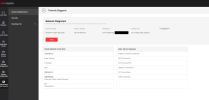
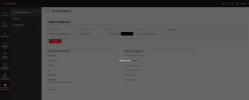
Virtual Host - (new)
- Virtual Host is enabled but there's no ability to use it.
- at one time, there was a clickable link to get to my cameras. With this release, I'm no longer seeing a clickable link.
- it may be related to my specific setup with a DS-7616NI-M2. I don't really need Virtual Host as I can access my cameras directly (without going thru the NVR)
- just seems odd that the capability disappeared
Hi @sportster... the virtual host function still works me including the clickable links... maybe it's a browser issue? I'm using Microsoft Edge browser:
Good to know. Thx for that info. I suspect it might be related to the NVR Model # given that my unit is "not" a /8P, /16P, or /24P version. Let me work the problem though before making any conclusion(s). My current PC doesn't have Edge but I'll see what I can do about that too.Hi @sportster... the virtual host function still works me including the clickable links... maybe it's a browser issue? I'm using Microsoft Edge browser:
Thx for the tip.Well..... this is embarrassing. I'll have to eat crow on this one. Virtual Host is working fine.
In my hast, I turned it on to test & was looking for the usual clickable link. Didn't see it. Looked around a bunch..... didn't see it. Re-booted the NVR again. Checked again. Still didn't see the clickable link.
Unnoticed by me, I needed to scroll RIGHT on the screen. Once I scrolled RIGHT, voila, there was the clickable link.... and it works as intended.
My apologies for raising a false alarm. Doh !!!
In my hast, I turned it on to test & was looking for the usual clickable link. Didn't see it. Looked around a bunch..... didn't see it. Re-booted the NVR again. Checked again. Still didn't see the clickable link.
Unnoticed by me, I needed to scroll RIGHT on the screen. Once I scrolled RIGHT, voila, there was the clickable link.... and it works as intended.
My apologies for raising a false alarm. Doh !!!
I never mentioned this... on the prior version the console live view split would switch from 3x3 to 1 single camera by itself after a few hours... I had to manually change back to 3x3 each time... with this new version, this is no longer happening.
That's exactly what I did the other day. Even put a post about it so you're not on your own with that one.Well..... this is embarrassing. I'll have to eat crow on this one. Virtual Host is working fine.
In my hast, I turned it on to test & was looking for the usual clickable link. Didn't see it. Looked around a bunch..... didn't see it. Re-booted the NVR again. Checked again. Still didn't see the clickable link.
Unnoticed by me, I needed to scroll RIGHT on the screen. Once I scrolled RIGHT, voila, there was the clickable link.... and it works as intended.
My apologies for raising a false alarm. Doh !!!
New 5.04.65 build is published DS-7608NI-M2/8P
Similar threads
- Replies
- 15
- Views
- 2K
- Replies
- 55
- Views
- 5K

- Replies
- 11
- Views
- 965

- Replies
- 65
- Views
- 17K

